Project setup
Contact us to learn more about licensing the CoPilot Native Nav SDK.
To use the CoPilot Native Nav SDK for iOS, set up Carthage dependencies following the steps below.
Upgrading to 2.2.0
Upgrade navigation, webservices, plugins, and Turf together. Remove Solar from your Cartfile and embed list; TrimbleMapsNavigation 2.2.0 no longer needs it. Navigation day and night styling follows the system appearance; see StyleManagerDelegate changes in Upgrading to 2.2.0.
Step 1
In a Cartfile include the necessary frameworks:
binary "https://trimblemaps.jfrog.io/artifactory/carthage/RoutePlugin.json" == 2.2.0
binary "https://trimblemaps.jfrog.io/artifactory/carthage/SearchUIPlugin.json" == 2.2.0
binary "https://trimblemaps.jfrog.io/artifactory/carthage/TrimbleMapsAccounts.json" == 2.1.2
binary "https://trimblemaps.jfrog.io/artifactory/carthage/TrimbleMapsMultiplatformUI.json" == 1.2.0
binary "https://trimblemaps.jfrog.io/artifactory/carthage/TrimbleMaps.json" == 2.1.1
binary "https://trimblemaps.jfrog.io/artifactory/carthage/TrimbleMapsWebservicesClient.json" == 2.2.0
binary "https://trimblemaps.jfrog.io/artifactory/carthage/Turf.json" == 1.1.0
binary "https://trimblemaps.jfrog.io/artifactory/carthage/TrimbleMapsMobileEvents.json" == 1.0.0
binary "https://trimblemaps.jfrog.io/artifactory/carthage/TrimbleMapsCoreNavigation.json" == 2.2.0
binary "https://trimblemaps.jfrog.io/artifactory/carthage/TrimbleMapsNavigation.json" == 2.2.0
binary "https://trimblemaps.jfrog.io/artifactory/carthage/TrimbleMapsNavigationNative.json" == 2.1.0
binary "https://trimblemaps.jfrog.io/artifactory/carthage/RoutingProfilesPlugin.json" == 2.2.0
github "auth0/JWTDecode.swift" == 3.0.1
Step 2
Build and include the Carthage frameworks in the iOS project.
carthage bootstrap --platform iOS --use-xcframeworks
Step 3
Navigate to your project using the Finder app on your Mac. That’s where the Carthage folders are created.
.../YourNavSDKProject/Carthage/Build
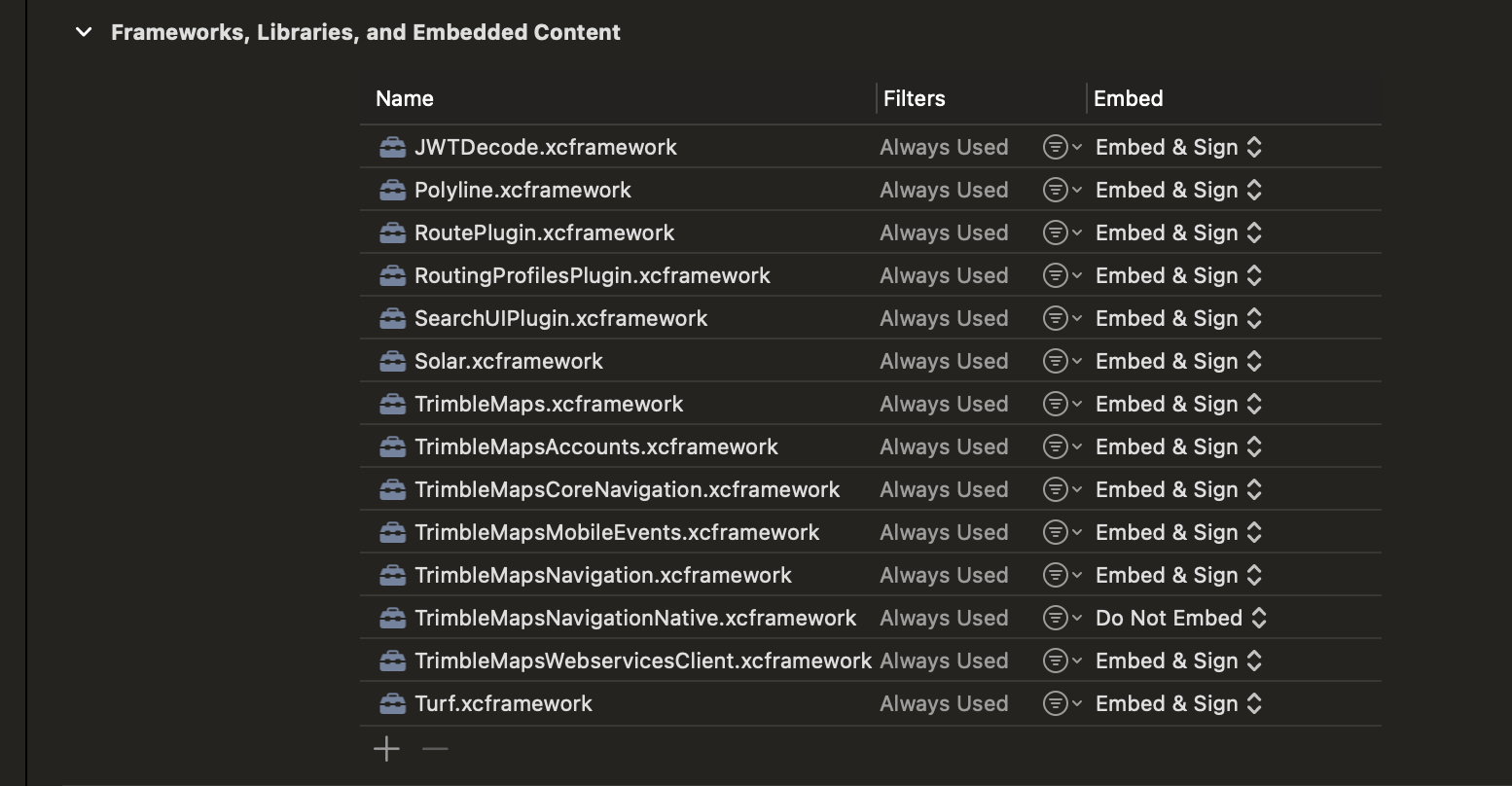
In this directory, there are .xcframework folders. Select all these folders and drop them in the Frameworks, Libraries, and Embedded Content in your Xcode project. This is located in the Navigator panel > Targets (Click ProjectName) > General > Frameworks, Libraries, and Embedded Content.
Do not embed Polyline or Solar xcframeworks. Ensure Turf remains embedded. If you previously embedded Polyline or Solar for the SDK, remove them from Frameworks, Libraries, and Embedded Content when you upgrade.