Trimble layers
Contents
Avoid/Favors Layer
(First available in v2.1)
The Avoid/Favors Layer toggles the display of Route Modifiers—road segments designated to be avoided or favored when the route is calculated.
- This setting controls map display only. It does not influence routing logic. The routing algorithm respects all avoid/favors assigned to the
assetIDregardless of whether they are displayed on the map. - Ensure that any modifiers displayed on the map are correctly associated with the active
assetIDto prevent discrepancies between the map and the calculated route.
The sample code below shows how to apply the layer.
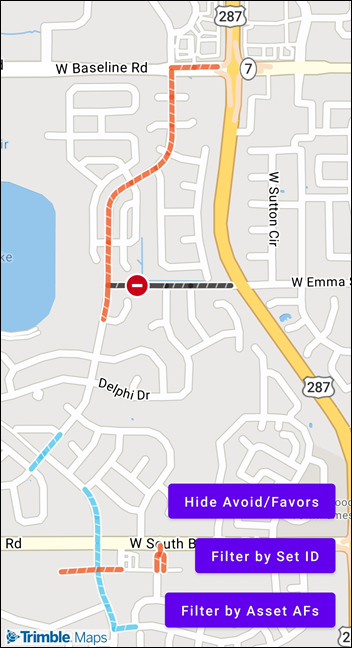
Toggle and Filter Avoid/Favors Layer
This displays all avoid/favors associated with your API key.
mapView.style?.toggleAvoidFavorsVisibility()
You can also filter which sets of Route Modifiers are displayed using their setIDs.
mapView.style?.setAvoidFavorsFilter(setIds as [NSNumber])

// An empty array will clear the filter and show all AFs on the account
mapView.style?.setAvoidFavorsFilter([])
There are two ways to retrieve setIDs
Option 1: Retrieve all setIDs based on your API key
internal var afSetIds: [Int] = []
let avoidFavorsClient = TMAvoidFavorsClient()
        let options = TMAvoidFavorsOptions(pageSize: 25, pageNumber: 0, key: AccountManager.default.account.apiKey) // Fetch the first 25 AFs on the account
        avoidFavorsClient.getAvoidFavorSets(options) { response, error in
            if let response = response, response.totalAFSetCount != 0 {
                DispatchQueue.main.async {
                    self.afSetIds = response.afSets?.map { $0.setID } ?? []
                }
            } else {
                print("No avoid/favor sets found in response")
            }
        }
Option 2: Retrieve setIDs assigned to a specific assetID
internal var assetAFSetIds: [Int] = []
let assetAvoidFavorsClient = TMAssetAvoidFavorsClient()
        assetAvoidFavorsClient.getAssetAvoidFavorSets(AccountManager.default.account.assetId!) { response, error in
            if let response = response, response.data?.isEmpty == false {
                DispatchQueue.main.async {
                    self.assetAFSetIds = response.data?.map { $0.setId } ?? []
                }
            } else {
                print("No asset avoid/favor sets found in response")
            }
        }